

This app works like a real autoharp: just push one of the chord buttons and strum! Autoharp uses high-quality audio samples and comes with standard 15 and 21 bar layouts.
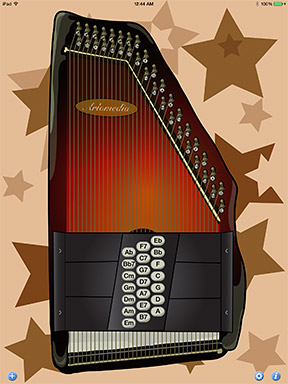
These features are designed to make the autoharp app as realistic
as possible:
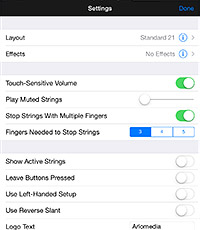
- Touch-sensitive volume: The faster you strum, the louder the strings sound. You can use this feature to play more expressively, or turn it off for a more consistent volume.
- Play muted strings: Strumming across a muted string on a real autoharp makes some sound; you can mix the muted string sounds in at any level, or turn them completely off for a cleaner sound.
- Stop strings with multiple fingers: You can mute a real autoharp by laying your hand across the strings; you can mute this app by touching the strings with multiple fingers. You can configure this feature to require 3, 4 or 5 fingers, or turn it off completely if it interferes with your playing style.
A few more features make the app easier to play:
- Show active strings: Each chord button mutes some strings. This feature highlights the remaining strings so you know exactly where to strum.
- Leave buttons pressed: You can avoid a mushy sound between chord changes, or play the autoharp with one hand, by enabling this feature, which leaves a chord button pressed after you take your finger off it, then raises it automatically when you press another one.
More adventurous players can experiment with these advanced features:
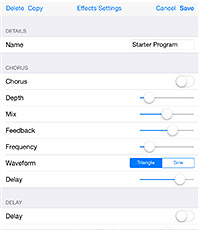
- Apply digital effects: Autoharp includes built-in chorus, delay and reverb effects to expand your sonic palette. You can configure each effect and enable them in any combination. With a $.99 in-app purchase, you can save multiple effects programs and switch between them.
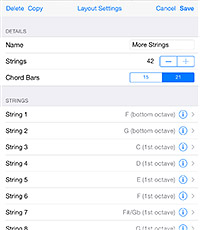
- Customize the chord layouts: With a $3.99 in-app purchase, you can set the note assigned to each string (from a total of 45 available notes) and set the strings assigned to each chord bar (either 15 or 21), then switch between any of your saved layouts. This lets you optimize your sound for each song, or test a new setup before modifying a real autoharp.
- Send MIDI notes: If you have any MIDI equipment, you can use the Autoharp app as a MIDI controller. The app will send a note-on command when you strum an active string and a note-off command when you mute a string. It will also send velocity information if you use the touch-sensitive volume option.